Last Updated on May 15, 2026 by Joy Kyalo
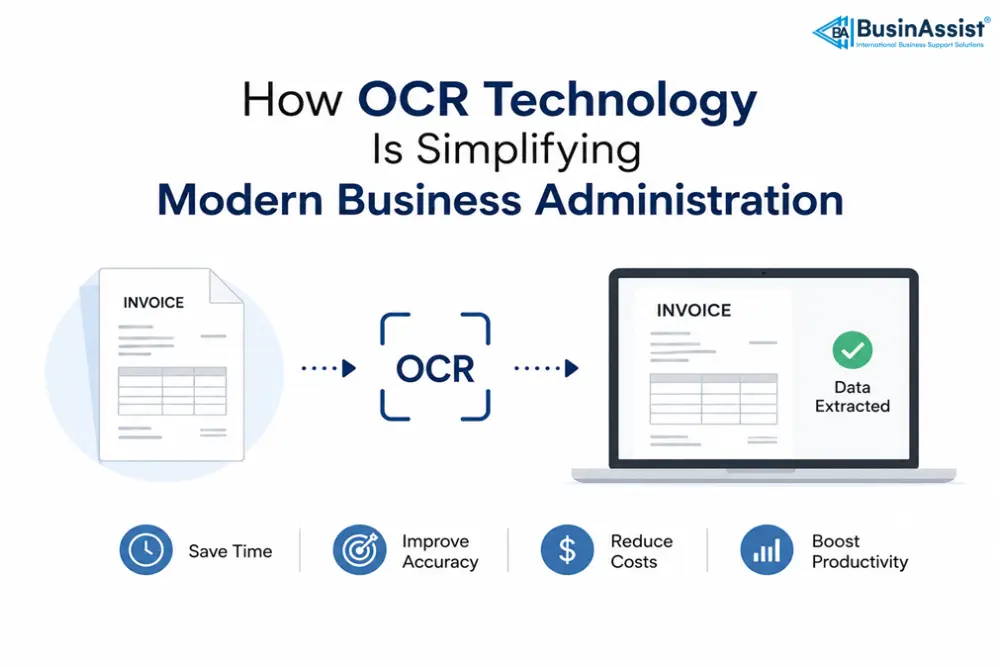
OCR technology helps modern businesses automate document processing, reduce manual data entry, improve administrative accuracy, and simplify workflow management. By converting scanned documents, invoices, receipts, and images into editable digital text, OCR systems save time and improve operational efficiency.
Modern OCR solutions powered by artificial intelligence and machine learning are now widely used by businesses to streamline administration tasks, reduce paperwork, and improve productivity. It helps companies boost their administrative accuracy and efficiency in several ways. This blog post is going to cover some of the major ways in detail.
How Does OCR Technology Help Modern Businesses?
OCR technology helps businesses automate document processing, reduce paperwork, improve data accuracy, simplify administrative workflows, and convert physical documents into editable digital formats.
Key Takeaways
- OCR technology converts physical documents into editable digital text.
- Businesses use OCR to automate repetitive administrative tasks and reduce manual data entry.
- Modern OCR systems improve workflow accuracy and document accessibility.
- AI-powered OCR tools support multilingual document processing for global businesses.
A Brief Overview of OCR
Before directly heading toward the ways, it will be good if you get a brief overview of OCR. This will help you comprehend the information coming ahead.
OCR stands for Optical Character Recognition. It was first introduced in the early 20th century, and since then, the technology has experienced continuous innovations.
Modern OCR systems use pattern recognition, AI and machine learning technologies. So they can effectively extract text from scanned documents, invoices, business receipts, and more into editable format.
To make this technology accessible, it has been integrated into numerous tools that are easily available on the internet. By using them, businesses can convert images to text with a few clicks, saving valuable time and effort.
Now, let’s understand how OCR simplifies administration tasks for modern businesses.
| OCR Benefit | Business Impact |
|---|---|
| Automated Data Entry | Saves time and reduces manual work |
| Paperless Workflow | Improves document management |
| Improved Accuracy | Reduces human errors in data processing |
| Multilingual Support | Supports international business operations |
| Better Accessibility | Allows easier document search and collaboration |
The Critical Role of OCR in Simplifying Modern Business Administration

There are multiple ways in which optical character recognition technology helps modern businesses to simplify administration processes.
1. Reduce Dependence on Paperwork
We all know that administrative work usually involves dealing with a large volume of physical:
- Documents
- Invoices
- Forms
- Reports
- Contracts
And much more.
Obviously, employees spend valuable time and effort handling, sorting, searching, and storing these documents. This increases the overall chances of workflow disruptions and reduced productivity.
This is where optical character recognition technology comes into play. It helps modern businesses to reduce dependency on physical paper by converting paper documents into editable digital formats.
Simply, take pictures of the physical documents, upload them to OCR tools, and get them converted into digital format.
2. Automation of Repetitive Tasks
Data entry is one of the most hectic yet repetitive tasks of business administration. Employees need to review documents, invoices, and receipts to extract valuable data and then enter it into the database.
Traditionally, businesses used to hire specialized professionals to get this task done. Obviously, this requires valuable time, effort, and resources.
Fortunately, this isn’t the case with modern companies. As they can utilize the power of OCR technology to automate the data extraction from images, scanned documents, and more with a few clicks.
Automating repetitive tasks allows businesses to shift their focus to more important administrative tasks, such as communication and resource management.
3. Better Accuracy
If the employees are extracting data from administrative documents on their own, there is a strong chance of human errors. For instance, they may unintentionally skip some information or make typing or data entry errors.
Having errors in the extracted data will not only affect the workflow but also harm the overall credibility of the business in the market.
Gladly, OCR technology solves the problem. The OCR tools available online are powered by advanced algorithms and AI models to accurately perform the extraction process even from low-quality images or documents.
Moreover, these are also capable of extracting special characters, numbers, symbols, fonts, and even mathematical equations with excellent accuracy.
4. Increased Accessibility
When documents are stored in physical format, only one or two people can interact with them at the same time, while other employees have to wait. This will definitely slow down the overall administrative workflow.
Moreover, locating a document from a bunch of papers and then finding a specific piece of information in it is quite hectic. By utilizing OCR technology, modern businesses can easily tackle such problems.
They can quickly convert important documents into a digital format and save them in Google Docs for easy collaboration anytime from anywhere. Additionally, cloud-based documents allow quick and easy searching of any information.
5. Multilingual Support
Our world has become a global village… right? Now, modern businesses are targeting international customers. They are serving clients, customers, and stakeholders who speak different languages.
The language barrier creates a challenge for administrative staff when processing and managing multilingual documents. Here, OCR technology proves really beneficial.
It is capable of efficiently recognizing and processing documents in numerous international languages, including English, Spanish, French, and many more. This allows staff to seamlessly digitize essential documents regardless of their linguistic origin.
Now, you will have a clear understanding of how exactly OCR technology is simplifying administrative tasks for modern businesses.
Final Words
A simplified workflow is highly essential for business administration. When businesses rely on manual paperwork, repetitive data entry, and physical paper management, productivity often slows down.
Luckily, Optical character recognition technology helps simplify these processes by automating data entry and digitizing paper documents for easy handling and management. In short, OCR technology is assisting modern businesses to boost their administrative efficiency without compromising on accuracy.
Frequently Asked Questions (FAQs)
Q: What types of documents can OCR process?
Ans: It can process a wide variety of documents, including invoices, receipts, forms, reports, contracts, and much more.
Q: Can OCR extract data from low-quality images and documents?
Ans: Yes, advanced OCR tools can effectively scan and extract data from images or documents that are a little blurry or poorly lit.
Q: Is OCR technology useful for any business?
Ans: Whether you are running a small or large enterprise, this technology can prove beneficial for you. This is because it is easier to implement, cost-effective, and highly accurate.
Q: What is the future of OCR in business administration?
Ans: The future of optical character recognition is connected with artificial intelligence and automation. The tools are becoming smarter, more accurate, and capable of handling the entire workflow at once.
Read Also:
- Best Time to Start a Business (UK): Why Right Now Might Be the Perfect Moment
- Easy Businesses to Start in the UK in 2026: Profitable Ideas for Aspiring Entrepreneurs
- Top 50 Small Business Ideas to Start in 2026: Low Investment and High Potential
- How Can You Start a Business Without Money? Smart Strategies to Begin
- What Happens if You Make a Mistake on Your Tax Return UK: A Comprehensive Guide

The BusinAssist Editorial Team has 15+ years of experience writing about small business and company formation in the UK, Canada, and the USA. We simplify complex processes and provide practical insights to help entrepreneurs succeed. Business Assist with BusinAssist – your partner for business success.